
Choose AI chat assistants when
- The task is a one-off question or a first draft
- You want to brainstorm, write or code interactively
- There is no file you keep coming back to
Comparison
ChatGPT, Claude, Gemini, Grok and Perplexity are excellent general assistants. CTRON Loop is built for one job: turning the spreadsheets and documents you work with every month into dashboards and reports you can repeat, with every figure calculated from your file. It connects to the same providers, so you can run it on your own OpenAI, Anthropic, Google, xAI or Perplexity key.
Comparison reviewed on September 24, 2026. Product features and pricing may change.
Short answer
Use a chat assistant for open-ended questions, drafting, brainstorming and one-off analysis. Use CTRON Loop when the work repeats and is tied to your own files: the same dashboard or report every month, figures that must match the spreadsheet to the penny, and a saved process anyone on the team can rerun or schedule.
Side by side
| Criteria | CTRON Loop | AI chat assistants |
|---|---|---|
| What it is | A workspace that turns your files into dashboards, reports and reusable workflows | General-purpose AI assistants for conversation, writing, coding and analysis |
| Spreadsheet figures | Calculated by a fixed engine from every row, so the same file gives the same answer every time | Many can analyse uploaded files; how the figures are produced varies by assistant and by request, and a new conversation can take a different approach |
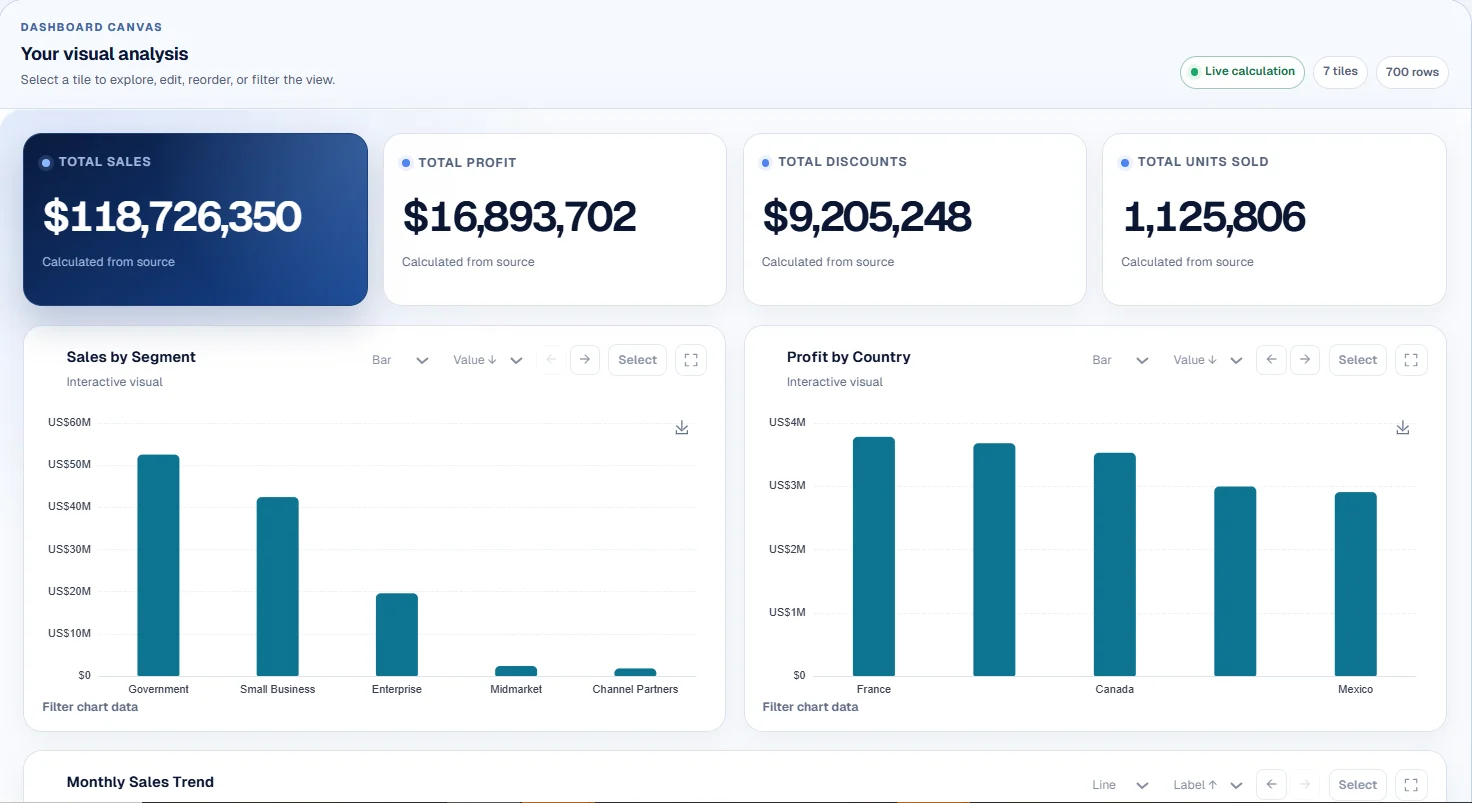
| Dashboards | An interactive dashboard with KPIs, charts, slicers and a breakdown table, kept in your workspace | Charts produced inside the conversation |
| Repeat work | Save as a Loop and rerun on next month's file, or on a daily or weekly schedule with the result emailed | Reuse a prompt or project; each run is a new conversation |
| Your context | Upload files to your workspace once; every task and Loop draws on them | Projects and custom instructions hold files and context |
| Reports and exports | Board reports from a fixed section library, downloadable as PDF, Word, PowerPoint or Markdown and stored exactly as sent | Text and files produced in the chat, shaped by each request |
| Sharing | Read-only dashboard and report links that can be revoked or set to expire | Shareable conversation links |
| Models | Managed AI included, or connect your own key from OpenAI, Anthropic, Google Gemini, xAI Grok, Perplexity and others | Each assistant runs its maker's own models |
| Best for | Recurring reporting and analysis on your own files | Open-ended questions, writing and one-off analysis |
Can they be used together?
Yes, and many people do. Keep your favourite assistant for open-ended thinking and drafting, and use CTRON Loop for the work you repeat. If you already have an API account with OpenAI, Anthropic, Google, xAI or Perplexity, connect that key and CTRON Loop runs on it, with usage billed by your provider rather than by us.
Questions
Yes, they can all work with uploaded spreadsheets. CTRON Loop differs in what happens around the analysis: figures come from a fixed calculation engine so the same file always gives the same totals, the result is an interactive dashboard in your workspace, and the whole method saves as a Loop you can rerun or schedule.
CTRON Loop connects to models from OpenAI, Anthropic, Google, xAI and Perplexity, as well as DeepSeek, Mistral and Groq. Every plan includes managed AI within its limits, or you can connect your own API key.
Those are consumer subscriptions for the chat apps and do not include API access. CTRON Loop connects with an API key from the provider's developer platform, which is billed by the provider separately.
When you ask a question about a dashboard, only the calculated totals already on screen are sent to the model, never the rows of your file. Document tasks send the document text the task needs.
For a one-off question that works well. For work you repeat, CTRON Loop saves you re-uploading, re-explaining and re-checking: the file stays in your workspace, the method is saved, and the figures reconcile with the source every time.
Open a sample or upload a spreadsheet and get a dashboard before creating an account.
Try CTRON Loop freeNo account, no card, no API key.